The Guest Count Changed on the Call. Did It Change in Your File?
Tuesday, a 40-minute planning call. Somewhere around minute 22, the guest count went from 140 to 165. Around minute 31, the venue coordinator mentioned load-in now opens at 2, not 3. Everyone nodded. The call ended, you jumped to the next one, and the event record still says 140 guests and a 3 PM load-in. You won't find out until the caterer asks, or until you're standing at a locked loading dock.
The call is the best record you have, and the hardest one to use
I've been working events for 30 years, and the planning call has always been where the real decisions happen. It's also where they go to get lost. Afterward you've got three bad options: rewatch the recording, scroll a 40-minute transcript looking for the part where somebody said "oh, one more thing," or retype your notes from memory and hope memory got it right.
The expensive part isn't the time. It's the one detail that changed on the call and never made it into the file. Any meeting app will hand you a transcript now. What none of them knows is what your event record says, so none of them can tell you what just changed. Zenvents360 does, because the call happens inside it.
Hold the call on Zen video, and the notes write themselves
Zen video is the video call built into your Zenvents360 booking links. Your client opens the link and joins in the browser, nothing to install. Record the call, and once it ends the transcript and the summary are added to that event's notes by themselves. No downloading, no uploading, no retyping.
- Nobody is recorded without agreeing. Recording starts only once everyone on the call agrees, and the notes show who did.
- Every voice is named from who was talking on the call. Got one wrong? Rename the speaker and both notes are rewritten.
- Your event's own words go along with the audio, to help the transcript spell names the way your event does.
- The audio isn't kept around. It's deleted once the transcript is saved, unless you choose to keep recordings, and the transcription service's copy is deleted too.
You get two notes on the event: the full transcript, kept internal, and the summary, marked as a meeting summary so it stands apart from the notes you typed yourself.
Call was on Zoom, Teams or Meet? Drop the transcript in
Not every call is yours to host. When the planner sends a Teams invite or the venue runs it on Zoom, open the event, start a new note, and drop the transcript on it, or paste the text. It takes .txt, .vtt, .srt, .md, .docx and .doc. Zoom and Teams download a .vtt (Teams also does .docx); Google Meet saves a Google Doc you can download as .docx or .txt. Your own rough notes work too.
The file is read on our server and its text goes into the note. The file itself is never stored.
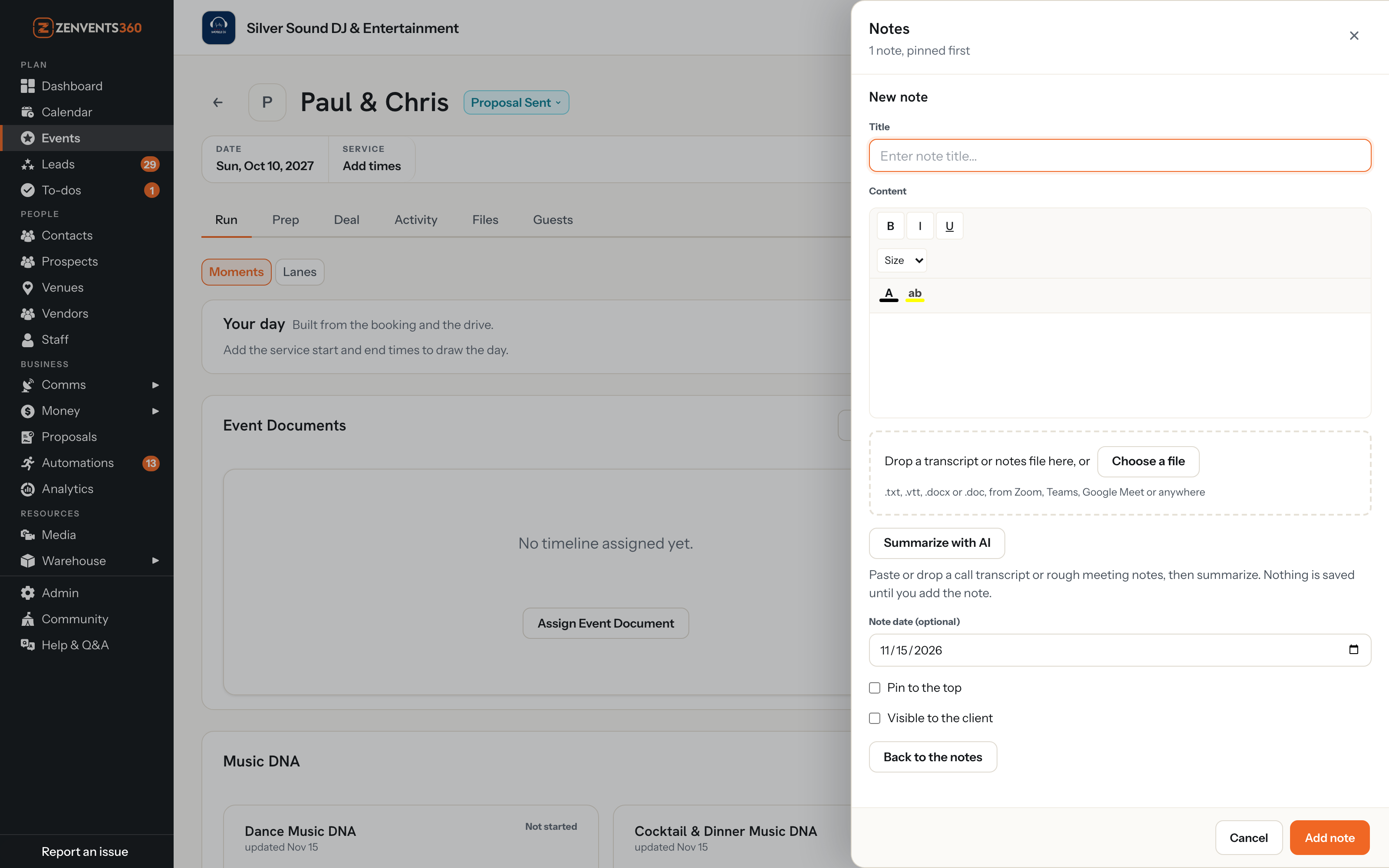
For calls held somewhere else: drop the transcript on a new note, or choose it.
A summary that already knows the event
Whether the call was recorded on Zen video or dropped in from another app, the same summarizer reads it, and it reads the event too. (For an upload, click Summarize with AI.) The transcript goes to the model together with the event's own record: the date, the venue, the contacts, the timeline, the music lists and the rest of what you've saved. That's the difference between a generic meeting summary and one written for event work.
You get a short overview, then sections, and a section only appears when the call gave it something to say:
- Decisions: what was actually settled.
- Music: songs to play, songs not to play, and special songs with the moment they belong to. Empty when the call wasn't about music.
- Timeline and logistics: times, changes to the order, venue details, setup, and how to pronounce people's names.
- People and vendors: names, roles and any contact details mentioned.
- Differs from what is on file: every place the call doesn't match the event record, with both versions quoted.
- Open questions: what's still unresolved and the follow-ups, with who owns each one when somebody said so.
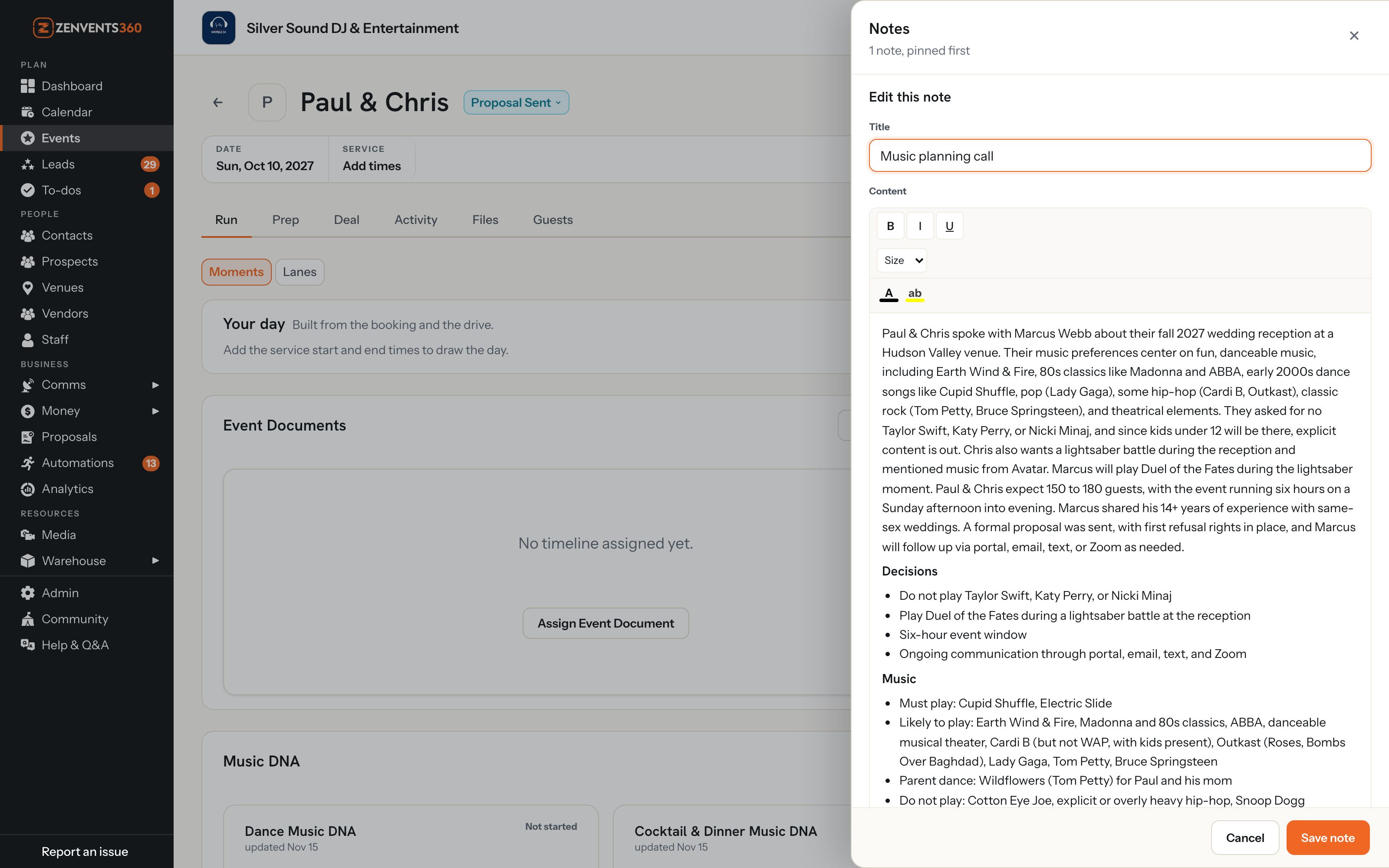
A real music planning call, summarized and open in the note editor. Names changed; shown on a demo event.
The section that pays for the whole thing
"Differs from what is on file" is the one I'd read first. Each line quotes the record and then the call, side by side:
Now the change is a to-do, not a surprise. Update the record, tell the caterer, move on. You didn't have to remember that 140 was the old number, because the summary had the record in front of it.
Whatever kind of call it was
Every event pro has their version of this call. A planner's final walkthrough, where the ceremony moved to the terrace. A florist's consult, where the centerpiece count came out of the conversation and not the order form. A caterer's tasting call, where two guests turned out to have allergies nobody had mentioned. A venue tour with the parking and load-in rules. An AV site visit where power and the setup window got pinned down. A DJ's music call, where the do-not-play list doubled. Same summary every time, and the Music section stays quiet when the call was about linens.
How it's written to behave
A summary you can't trust is worse than no summary, so the summarizer works to a short set of rules:
- Only what's in the notes. It's told not to bring in facts from the record that the call never mentioned, except to point out where the two differ.
- A maybe stays a maybe. "We might add a late-night snack" doesn't become a decision.
- Your spelling of names wins. When the transcript mangles a name, it prefers the spelling in the event record.
- Names or neutral words, not assumptions. It's written to refer to people by name, or as the couple, the client or their partner. It doesn't assume anyone's gender, and doesn't call anyone bride, groom, husband, wife or fiancé unless the transcript does.
Those are the rules it's written to follow, not a promise that it never slips. That's exactly why the next part matters.
You stay in charge of the record
For a transcript you drop in, the summary lands in the note editor, not in the event. Nothing is saved until you add the note. Switch between the summary and the original transcript with one click, edit either one, or discard the summary and keep the transcript. A recorded Zen call is added for you, as its transcript and its summary, and both stay yours to edit or delete like any other note. Either way the summary is marked a meeting summary, so you can tell it apart from the notes you typed yourself.
What to know before you rely on it
Honest limits, so nothing surprises you:
- Recording is for Zen video calls. There's no Zoom, Teams or Meet connection: for those, download the transcript and drop it in.
- Uploads: no PDF yet. Files up to 10 MB in the formats above.
- Summaries count toward your plan's monthly AI allowance. If the allowance has run out, a recorded call still gets its transcript, and the summary can be asked for again later.
- A summary of a transcript is only as good as the transcript. If the recording garbled a time, read the original before you change the record.
Catch what changed on the call
Hold your next planning call on Zen video and record it. When it ends, open the event's notes and read what differs from your file first.
Start Free Trial →Lou Paris
Founder of Zenvents360. 30+ years in the event industry. Built this because someone said he couldn't.