You Should Know If Inventory Is Already Booked Before You Promise It. Now You Will.
Most event software lets you build a gear list. Very few tell you whether that gear is actually available on that date. Zenvents360 Inventory Management tracks everything you own across multiple warehouses, logs every move in a full audit trail, and fires a warning the moment a proposal would put you in conflict.
The problem with event inventory is timing
The gear conflict does not happen when you book the event. It happens two weeks before, when someone asks whether you can do a same-weekend corporate gig and you say yes without checking. Or it happens the morning of, when you go to load the van and realize the powered speakers you counted on are already in someone else's truck heading to a wedding.
Most event management software treats inventory as a catalog - a list of what you own with quantities. That is useful for reference but not for operations. It does not tell you what is already committed, what is out for repair, or whether the two events you have booked on the same weekend are drawing from the same pool of gear.
Zenvents360 Inventory Management is built around the operational reality of running events - not just the catalog view. It tracks location, movement, service status, and availability in real time, and it surfaces conflicts at the proposal stage so you can make decisions before they become problems.
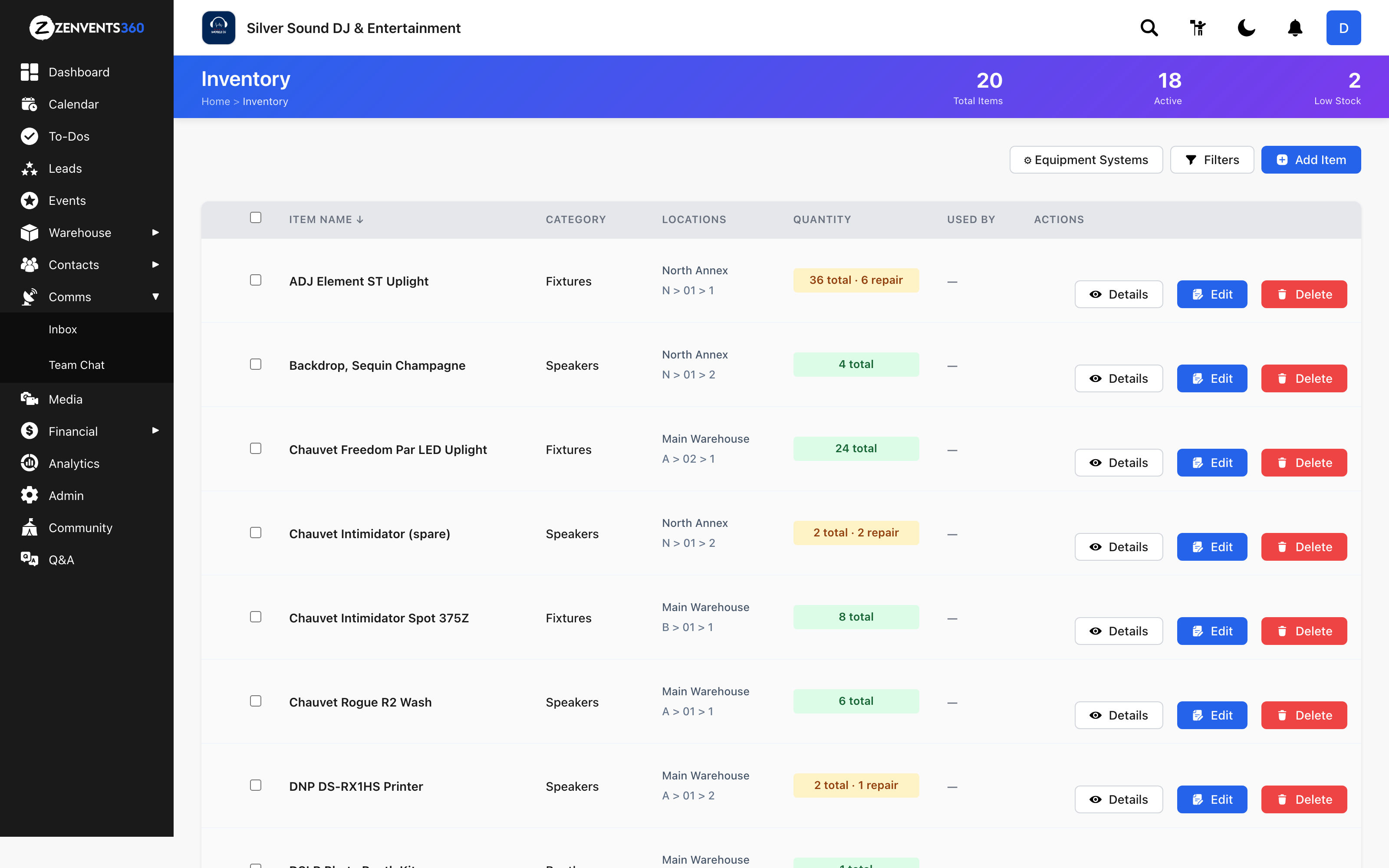
Multiple warehouses with bin-level locations
If your gear lives in more than one place - a rented storage unit, a second facility across town, a home garage, a dedicated production space - each of those is a separate warehouse in Zenvents360. You define each one, and every item in your inventory is assigned to a specific warehouse at all times.
Within each warehouse, you can assign bin locations to individual items. That is not just "main warehouse" but "main warehouse, row B, shelf 4." When someone goes to pull gear for an upcoming show, they are not hunting. They know exactly where to look. That saves real time in a load-out, and it means you stop relying on one person knowing where everything lives because they put it there.
Bin locations are optional - you can run a simple single-warehouse setup with no bins at all. But for larger operations with dozens or hundreds of items across multiple locations, the specificity pays off fast.
Adding a new item - each piece of gear is assigned to a warehouse and a GL account from day one
Moving inventory between warehouses
Gear moves. After a show, speakers go to a different facility. A lighting rig gets consolidated into one location for a big run of summer events. An employee drops off a few items at the secondary warehouse on the way home. These moves happen constantly in active event businesses, and they are exactly the kind of thing that makes a static inventory spreadsheet go stale within days.
In Zenvents360, warehouse transfers are logged as movements. You record where an item is going, and the destination warehouse immediately reflects the updated inventory. The origin warehouse loses that item from its count. The system is always current.
Every transfer is part of the audit trail, which means if someone asks where a specific piece of gear ended up after last weekend's events, you have a timestamped answer instead of a guess.
Assigning equipment in packages and add-ons
Inventory assignment works at two levels. At the package level, you define in your admin settings which items belong to a given package - say, two RCF 14A speakers and three Evolve 50s for the Ceremony and Reception package. Every time that package appears on a proposal, those items are automatically reserved against your available inventory for that event date. No manual step, no separate checklist.
Add-ons work the same way. If a client upgrades to an extended lighting package, the gear tied to that add-on is committed alongside it. And when equipment needs change for a specific event, you can also assign inventory manually from inside the event itself - individual items, specific quantities, pulled from whichever warehouse has them. Both routes feed into the same availability count, so the conflict warnings always reflect the full picture regardless of how the gear got assigned.
Package-level inventory assignment in admin - when this package is selected on a proposal, the gear is committed automatically
Per-event inventory assignment - individual items can be manually assigned directly inside an event, with location, quantity, and committed status all tracked
Pulling equipment from rotation for service
Equipment breaks. It blows a tweeter, needs calibration, goes out for a firmware update, or goes back to the manufacturer for warranty work. When gear is unavailable, your inventory numbers need to reflect that - because a piece of equipment in a repair shop is not available for a show two weeks from now, even if you technically own it.
Zenvents360 lets you mark individual items as out of rotation for service. You record the reason and the date it went out. While it is in that status, it is removed from available inventory. The system does not count it toward your capacity for upcoming events, and the conflict warnings below will factor it out automatically.
When the item comes back from service, you mark it returned. It re-enters the available pool immediately. No manual adjustment, no spreadsheet update. The status change is logged.
A complete audit trail of every movement
Every action taken on every item in your inventory is logged: assignment to an event, removal from an event, transfer to a different warehouse, bin location change, service pull, service return. Each log entry carries a timestamp and the user who made the change.
This matters more than it might seem at first. When you have a team of employees and subcontractors loading gear in and out of facilities, accountability gaps form fast. Items end up in the wrong place, quantities drift, and no one knows when it happened or who moved what. The audit trail closes that gap.
It also gives you a clear history for insurance purposes, for disputes with vendors who handle your gear, and for your own operations review when something goes missing or shows up somewhere unexpected. The answer to "where has this subwoofer been for the last six months" is in the log, not in someone's memory.
The item detail drawer - stock by location, total availability, and every reservation, transfer, and repair logged with timestamp and user attribution
Conflict warnings where decisions actually get made
The availability warning is the part that changes the way you run proposals. When a proposed gear list for an upcoming event would exceed what is actually available on that date - accounting for items already committed to other events and anything currently in service - Zenvents360 flags it. Not quietly, not buried in a report. Right where you are making the decision.
The warning appears in three places. First, on the proposal card in your event list - the overview tile you see when scanning your pipeline. If an event has a gear conflict, you see it without opening anything. Second, inside the proposal itself when you open it, with specific detail on which items are over capacity. And third, on the main inventory page, so you can see across all upcoming events at once which items are overcommitted and by how much.
The number behind the warning is real availability: total quantity owned, minus anything in service, minus anything already assigned to confirmed or proposed events on the same date or overlapping date range. You are not looking at what you own. You are looking at what you actually have available for that show.
Warning on the proposal card - you see the conflict before you even open the proposal
Warning inside the proposal - the exact item and the exact shortfall, right where you are editing
Warning on the main Inventory page - all upcoming conflicts in one place, so nothing hides behind an individual event
The difference between owning gear and knowing where it is
Every event operation with physical equipment deals with some version of this problem. The gear is there, sort of. It is mostly tracked, in a spreadsheet or in someone's head. And it works until it does not, usually at the worst possible moment.
Inventory Management in Zenvents360 is built for the reality of running events - not a warehouse operation, not a retail store. The same platform where you manage your leads, send proposals, collect signatures, and process payments is now also tracking exactly where every piece of gear lives, where it has been, and whether it will be there when you need it.
Know what you have before you promise it
Inventory Management is live in Zenvents360 now, including multi-warehouse tracking, bin locations, service pulls, audit trails, and availability warnings on proposals.
Start Free Trial →Lou Paris
Founder of Zenvents360. 30+ years in the event industry. Built this because someone said he couldn't.