Music DNA: Stop Guessing What Your Clients Want on the Dance Floor
The hardest part of music planning is not the setlist. It is getting an honest read on what a client actually wants when they cannot describe it themselves. Music DNA is a structured system built into Zenvents360 that extracts your client's taste through playlist imports, a curated song rating library, and automatic genre and decade weighting - and turns it into a full vibe profile before you touch a single fader.
The gap between what clients say and what they mean
Every DJ and event professional has been through the same conversation. You ask a couple what kind of music they want. They say "fun stuff" or "things everyone knows." Or the couple is split - one wants hip hop and the other wants 80s classics and neither one is going to budge. You try to dig deeper and you hit a wall, because they genuinely do not know how to describe it. They know what they like when they hear it. They have no language for it in the abstract.
The old approach was a basic music form with maybe a few genre checkboxes and a text field for must-plays and do-not-plays. That gets you some signal but not much. What you really need is a system that meets the client where their musical knowledge actually is - and then builds up a picture from there.
Music DNA does that. It is an intelligent music curation layer built directly into the Zenvents360 client portal, designed to work for clients who know nothing about music and clients who will quiz you on B-sides. The output is a concrete vibe profile - genre weights, decade preferences, energy and danceability ratings, and a curated list of must-plays and avoids - that you can actually use to plan a floor.
The screenshots below are the operator-side view of that same panel - the identical interface your client sees in the portal. Hitting Go Live opens a shared session so you and the client can work through it together in real time, each seeing the other in the corner; that is the staff badge and the live dot in these captures.
Start with musical knowledge level
The first thing the client does is tell Music DNA how they relate to music. Three options: New to Music, Casual Listener, or Musical Savant. That selection is not just a label - it changes what they see throughout the entire system.
New to Music routes the client straight into a guided song rating quiz - they do not have to name a single artist, they just react to songs. Casual Listener opens up search, so they can go find the artists and songs they already know they love. Musical Savant adds playlist import and the detailed genre grid on top of both.
The genre grid scales with the selection too. A casual listener sees 48 subgenre tags spread across the eight main buckets - enough to say "Motown, not New Jack Swing" without being overwhelming. A musical savant sees 108, down to Blue-Eyed Soul, Quiet Storm, Electro Swing, and Norteño. Someone new to music sees none of them, because asking a novice to rate Post-Punk against Shoegaze produces noise, not signal.
Playlist import from four services, with instant priority tagging
Clients who already have a playlist they love can import up to five of them directly into Music DNA, from Spotify, Deezer, Apple Music, or YouTube Music - whichever one they actually use. They paste the public playlist URL and the tracks import in bulk, up to the first hundred songs of each. From there every song can be tagged as a Must Play or Play If Possible with a single tap - fast enough to work through a 95-track playlist without typing a single title.
Imported tracks do not arrive unrated. Each one lands at 3 stars by default - it is in a playlist the client built, so it counts for something - and if the client has already rated the genre that track belongs to, it inherits that higher star value instead. Either way, imported songs start contributing to the genre and decade weighting immediately, without the client rating them one by one.
The import sits alongside two other ways in. There is a search field for adding individual songs or artists that are not in any playlist. And there is a plain paste box that takes a track list in whatever shape the client already has it - "Artist - Title", "Title - Artist", a numbered list, or one per line - which matters more than it sounds, because most couples arrive with a list in a Notes app or an email rather than a tidy playlist. All three routes end up in the same pool.
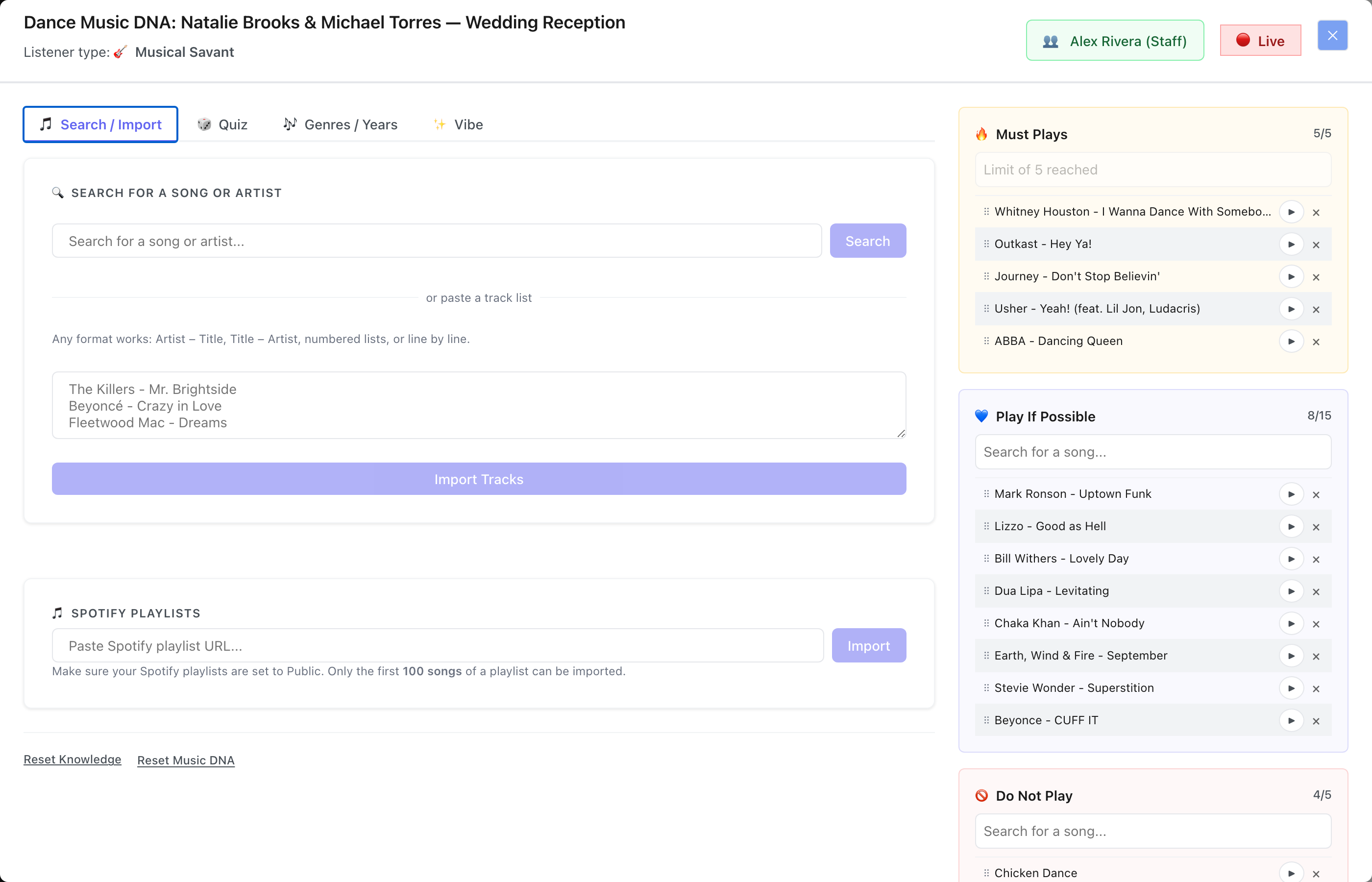
Three ways in - search, paste a track list in any format, or import a playlist from Spotify, Deezer, Apple Music, or YouTube Music. All of it lands in the same pool
The song rating quiz
For clients who do not have a playlist ready - or who want to go deeper than what they have already saved - the song rating quiz is where Music DNA gets its real signal. It opens on a filter: ten decades from the 1930s to the 2020s and nine genres, all switched on by default. A couple who genuinely never wants to hear anything before 1990 can say so up front rather than sitting through it.
Then the cards come - three at a time on a desktop, two on a tablet, one on a phone - each showing album artwork, title, and artist. The client plays a preview, rates it one to five stars, and tags it Must, Maybe, or No. Tapping Must rates the song five stars automatically, because nobody who just called a song a must-play needs to also be asked how many stars it deserves. As they go, the genres those songs live in accumulate weight and the decades they come from register. The picture is built from how they reacted to real music, not from what they said they wanted.
The quiz draws on a hand-curated 100-song library and never repeats a song the client has already rated. It is not mandatory - clients can skip a batch or stop at any point - but the more they rate, the sharper the output. The prompt at the top of the card section updates as they go.
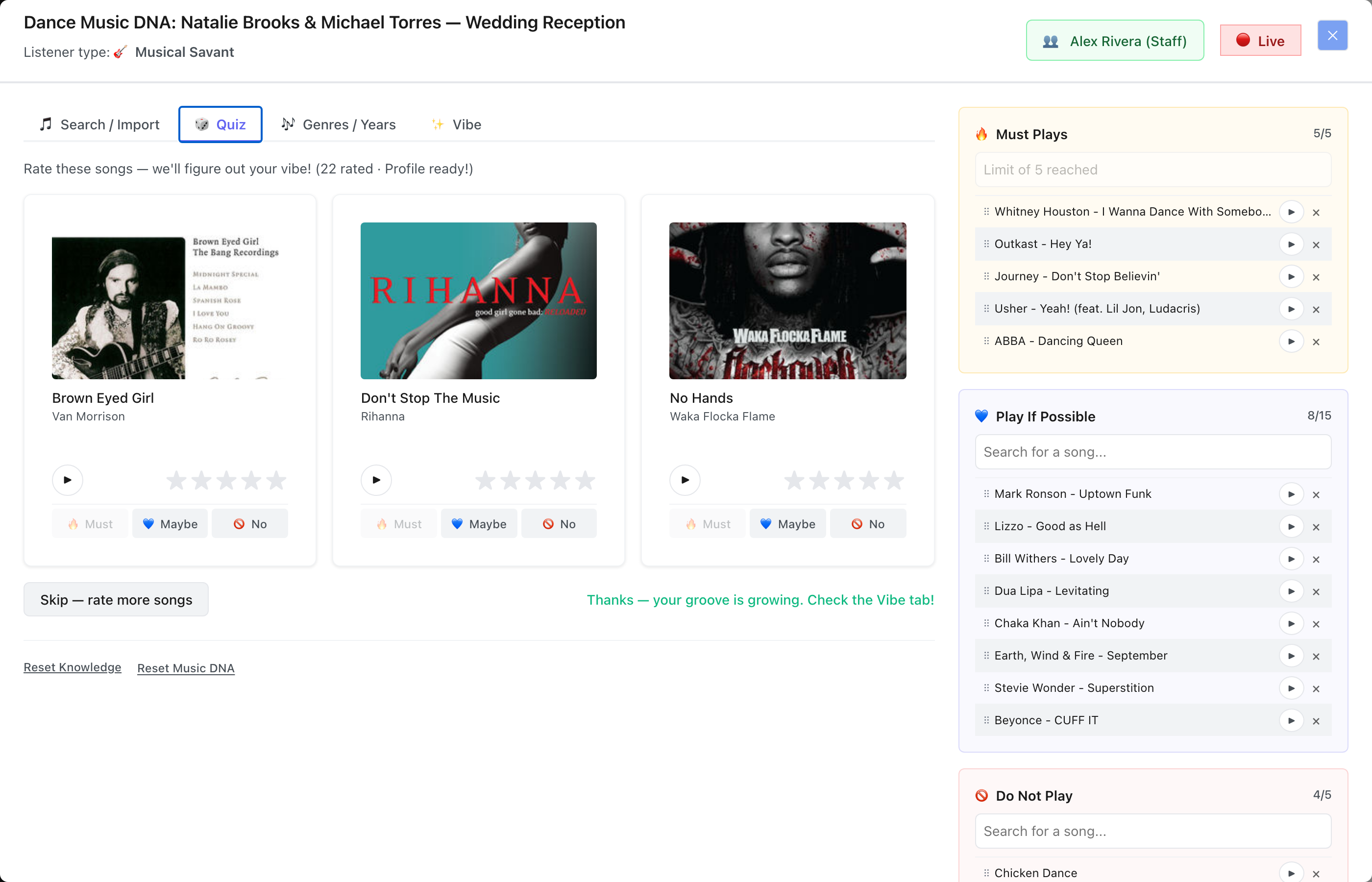
Play a preview, rate it, tag it. Three cards at a time on a desktop, one on a phone. Must is greyed out here because this couple has already used all five of their Must Play slots
Automatic genre and decade weighting
As the client rates songs and imports playlists, Music DNA is continuously updating two weighted preference panels: Genre Preferences and Decade Preferences. These are not self-reported - the client does not sit down and manually say "I am a 3-star Soul/R&B person." The system calculates those ratings from the actual songs they engaged with.
Each of the eight buckets carries its own overall star rating, and opens onto two rows: the decades that bucket spans, and its subgenre tags. So Soul/R&B is not one number - it is a 40s/50s-through-20s spread plus Motown, Funk, New Jack Swing, Neo Soul, Go-Go, Quiet Storm and the rest, each individually rateable. That level of specificity is what makes the output useful when you are building a setlist. The difference between a Motown-weighted and a New Jack Swing-weighted R&B client is enormous on the floor.
Because the decade chips sit inside each genre rather than in one global list, the profile can say something a single decade panel cannot: 70s Dance and 90s Hip Hop, but not 90s Dance. The whole grid updates in real time as songs are rated or imported, so the picture gets sharper the longer a client spends in it.
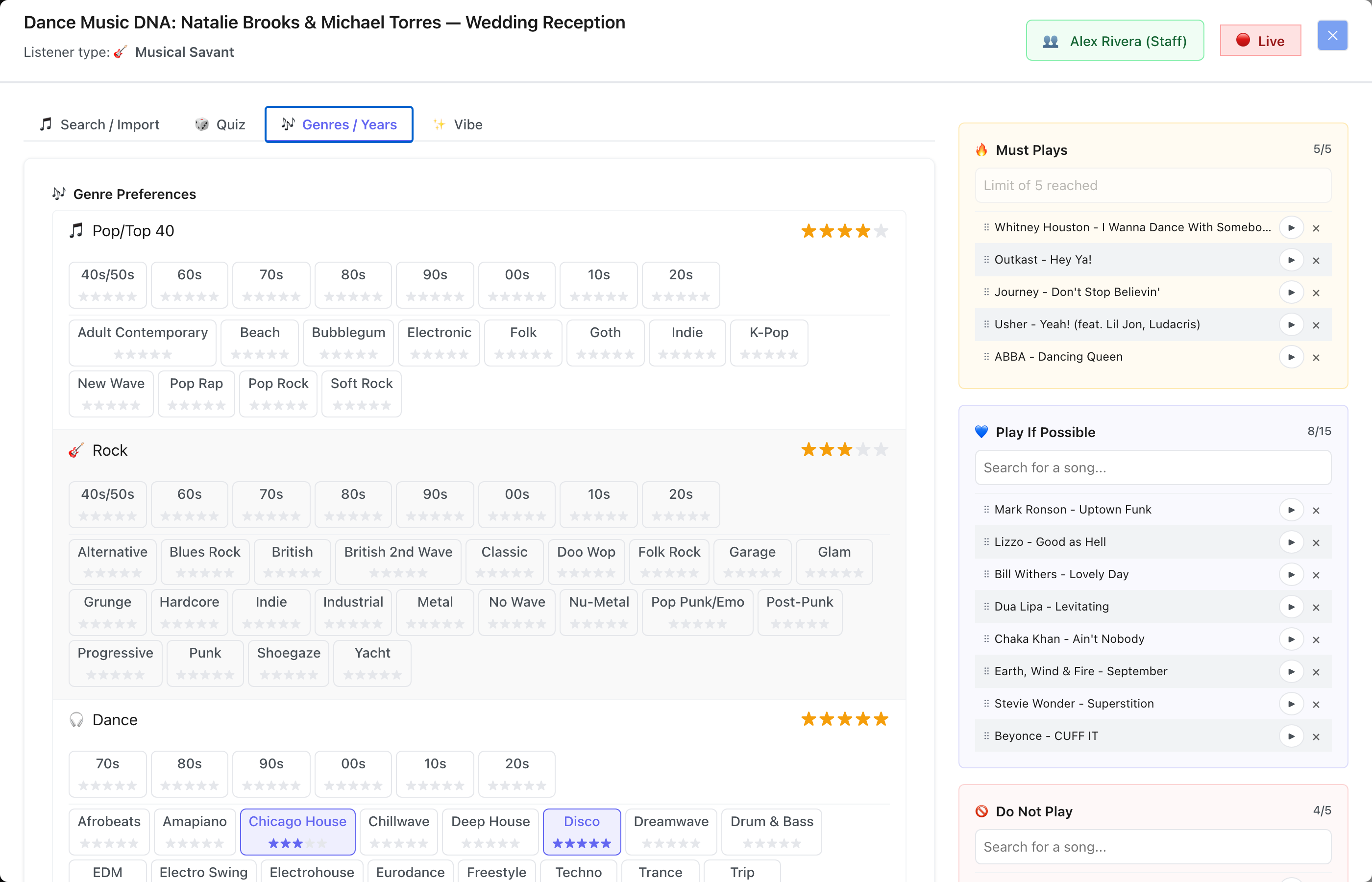
Every bucket carries its own stars, its own decade spread, and its own subgenre tags - 108 of them at the Musical Savant level
The DNA readout
Once at least a dozen songs have been rated three stars or better, Music DNA produces a vibe profile and surfaces it as three bars: Energy (mellow to high energy), Danceability (laid-back to let's dance), and Mood (melancholy to joyful). For the 100 curated quiz songs those figures are hand-sourced per track. For anything the client imported or typed in, they are estimated from the song's genres - close enough to move a bar in the right direction, and honest about being an estimate. Below twelve rated songs the panel stays hidden rather than showing three bars built on four data points.
Under the bars sits Peak Era - the decade the average release year of everything they rated positively falls into. It is a center of gravity rather than a winning decade, which is the more useful number when a couple's taste straddles two eras. Below that, Vibe Rated lists every song they scored, sorted highest first, so you can scan the actual evidence behind the bars instead of taking three averages on faith.
None of that requires the client to fill out a form or articulate anything in words. It comes entirely from their reactions to music. That is the point.
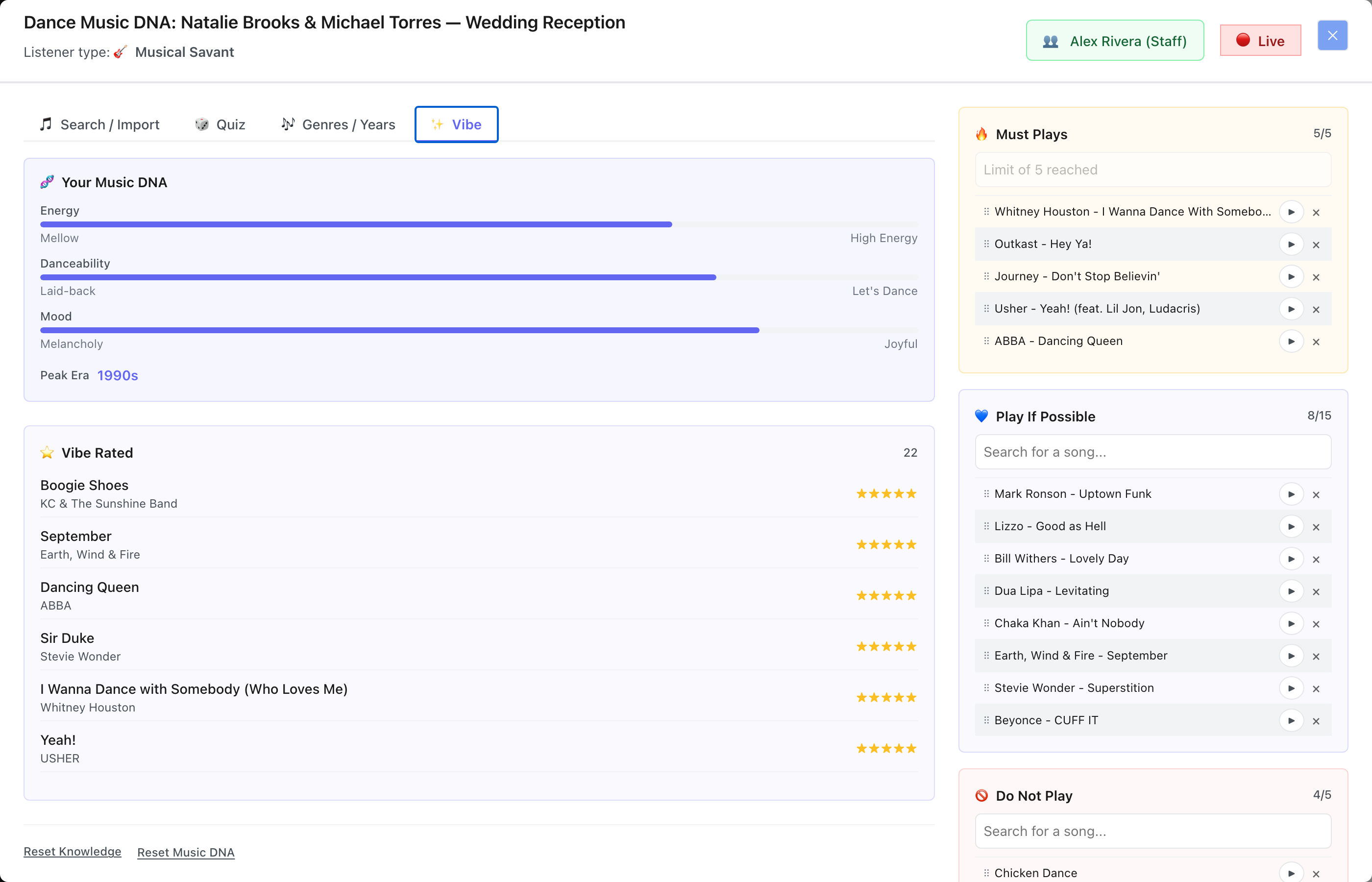
The readout: three bars, a peak era, and the rated songs they were computed from - none of it typed in by the client
Two separate profiles: Dance and Cocktail & Dinner
One of the more thoughtful decisions in Music DNA is that there are two completely separate instances of the system - one for the dance floor and one for cocktail and dinner. The reasoning is obvious once you think about it: a couple's cocktail hour vibe is almost never the same as their reception floor. If you plan both from the same music profile, you are going to miss one of them.
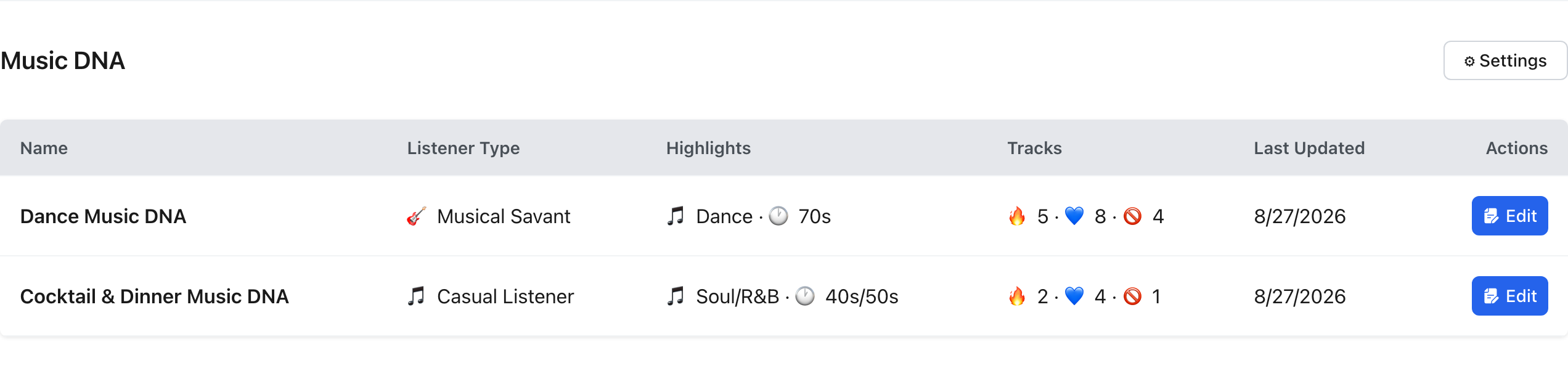
Each has its own knowledge level selection, its own playlist imports, its own song ratings, and its own DNA output. A client who leans heavily into high-energy hip hop for the dance floor might want background jazz or acoustic soul at dinner. Both of those signals live in the system side by side, clearly separated, ready to inform two different parts of your planning.
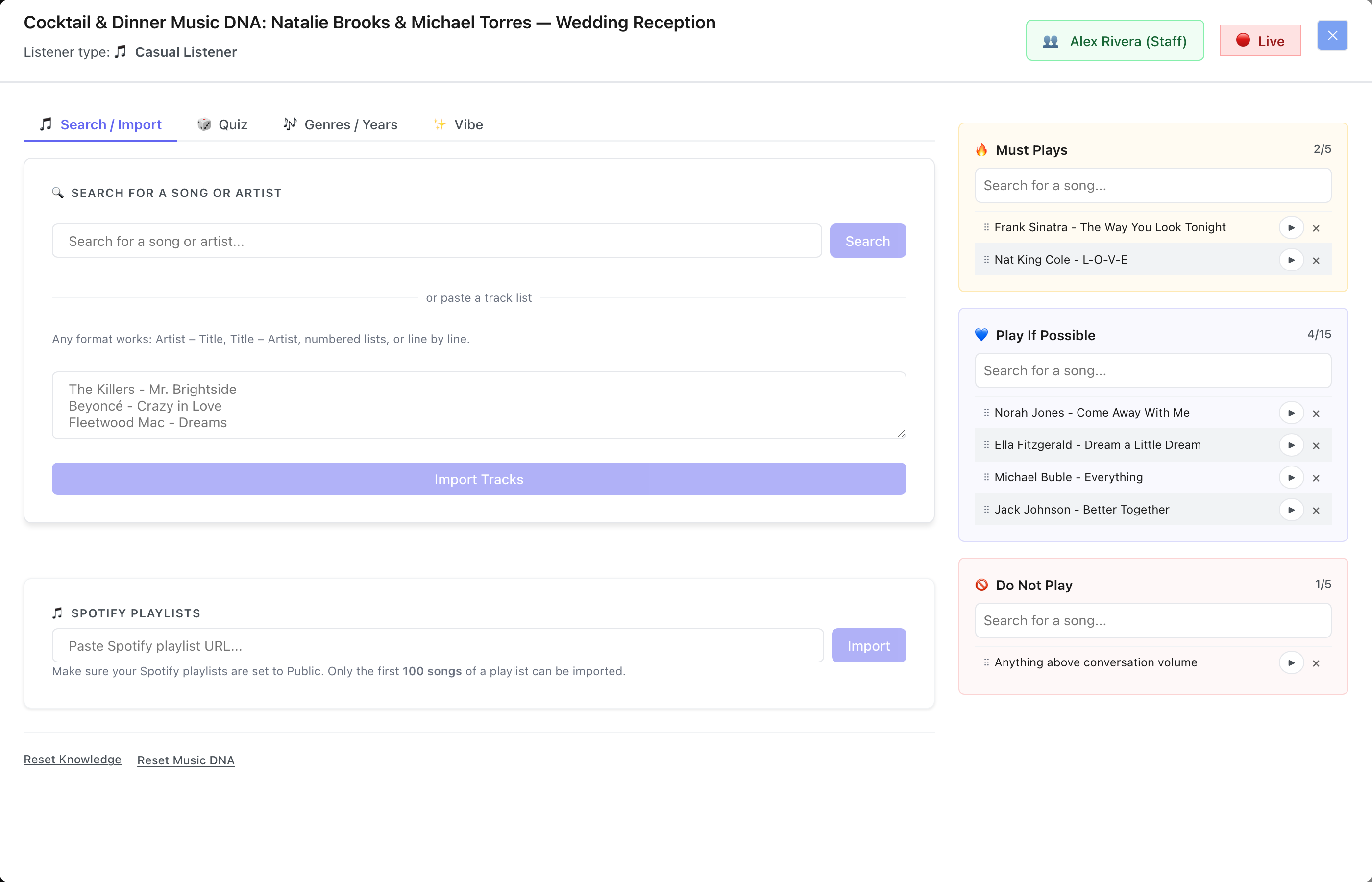
The same event's Cocktail & Dinner profile - separate tabs, separate ratings, separate lists
Everything aggregates to the Prep tab
Music DNA is part of the client-facing portal experience, but the data it produces does not stay locked away from you on the business side. All song choices - Dance DNA must-plays, play-if-possibles, do-not-plays, Cocktail and Dinner DNA selections, plus any music already entered directly in the timeline - are aggregated into the Prep tab on the event record.
The Prep tab shows a summary of both Dance and Cocktail & Dinner DNA profiles with the top-weighted genres and decades at a glance. Below that, every individual song the client selected across both sources is listed in a unified Music Selections table with its origin, its priority label, and the song itself. The whole list is exportable as CSV or PDF - clean and ready to hand to a second DJ, a band, or put in your own planning prep.
There is no version of Music DNA that creates a silo. The simple music entry fields inside the timeline still work exactly the same way for special songs like first dances, parent dances, and specific requests. Both inputs feed the same aggregated view.
The Prep tab aggregates both profiles and every song selection from the timeline into one exportable table
Business controls: enable what makes sense, disable what does not
Music DNA is not an all-or-nothing feature. Every component is individually controllable per event. From the Music DNA Settings panel, you can toggle Dance Music DNA and Cocktail & Dinner Music DNA on or off for the client entirely. Within each section, you can individually enable or disable playlist import, the song rating quiz, or visibility on the portal altogether.
That matters because not every client needs the full system. Some events are corporate gigs where you do not need a vibe profile at all. Some clients are specific enough in their requests that the song rater would just add friction. Turning off the rating quiz but leaving playlist import active, or hiding the whole section from a client who wants to leave everything to you - those are all real scenarios, and the controls are right there.
The same controls can be set at the package level in admin settings, so the right configuration is pre-applied to every event that uses a given package without having to manually adjust it each time.
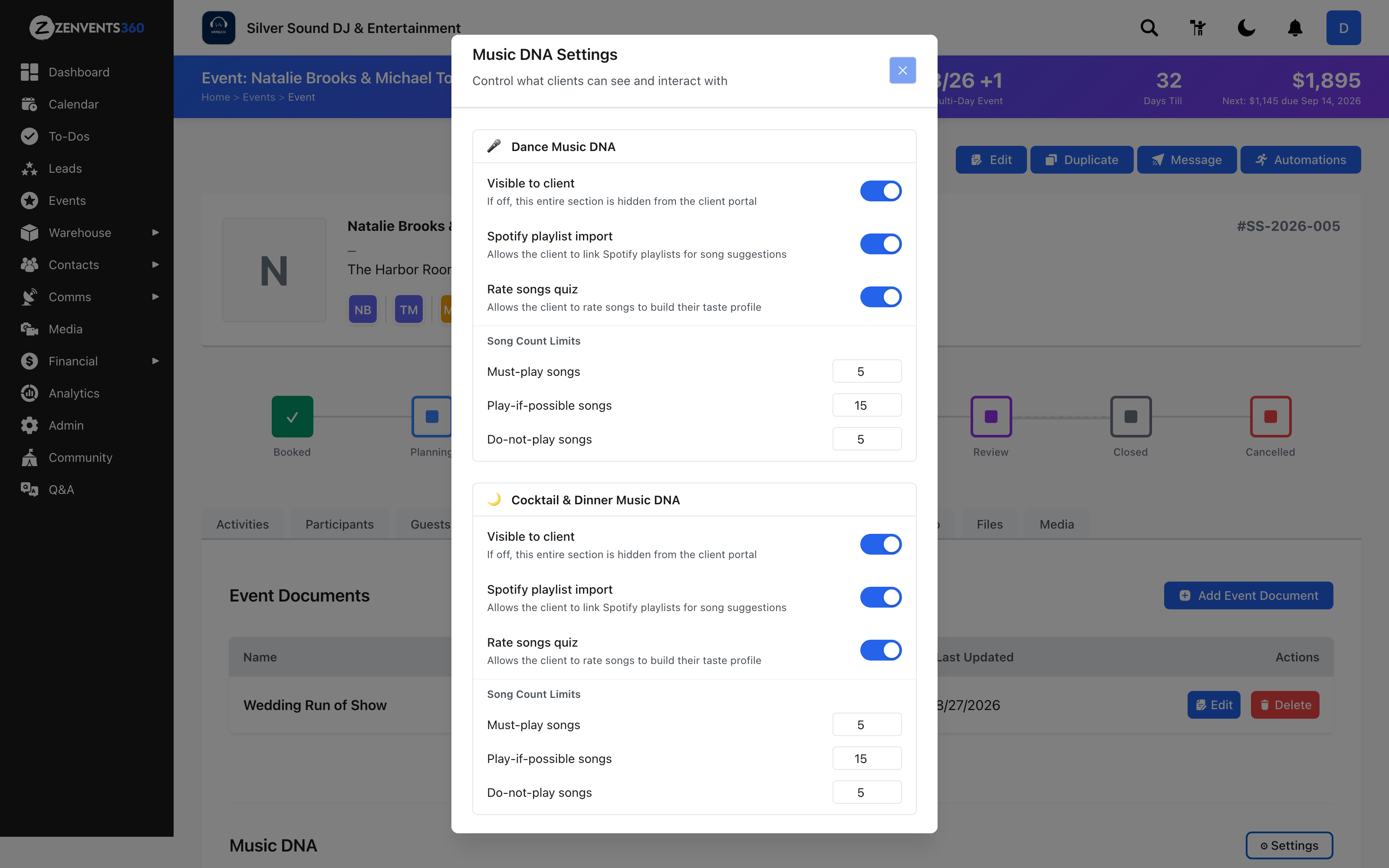
Per-event control over each profile - visibility, playlist import, the quiz, and how many songs each list can hold
The right amount of system for the people who need it
The feedback over the years was consistent enough that it was impossible to ignore. The original music tools were functional but thin. Clients wanted more ways to communicate their taste. Operators wanted more signal before they walked into an event. The gap between "I like everything" and an actionable setlist was still too wide.
Music DNA closes that gap. It meets clients at whatever level of musical knowledge they have. It extracts real preference data from the way they react to actual music rather than what they put in a text box. It produces a structured, exportable profile you can reference throughout planning. And it does all of that without making the client feel like they are doing homework.
For the clients who are music people - the couple with a 300-song playlist and opinions on subgenres - it gives them somewhere to put all of that. For the clients who have no idea what they want, it holds their hand through a curated selection and figures it out for them.
Both groups end up with a floor plan the DJ can actually use.
Update - September 7, 2026
Playlist import is no longer Spotify-only. Clients can now paste a playlist link from Spotify, Deezer, Apple Music, or YouTube Music, and Music DNA imports it the same way - up to five playlists, up to a hundred songs each, tagged and rated exactly as described above. Nothing else about the workflow changed; it just meets clients on whichever service they already use.
Know the vibe before you touch a fader
Music DNA is live in Zenvents360 now - playlist imports from Spotify, Deezer, Apple Music, or YouTube Music, song rating quiz, automatic genre and decade weighting, vibe profile readout, and full aggregation into the Prep tab.
Start Free Trial →Lou Paris
Founder of Zenvents360. 30+ years in the event industry. Built this because someone said he couldn't.