Venue Intelligence: Know Every Room Before You Walk In
You get an inquiry about a venue you have never touched before. Or maybe you are booked for tomorrow and you are wondering: can I roll my cart in? Is there power at cocktail hour? Will my phone even have signal? These are questions that should have answers before you arrive - and now they do.
The problem with showing up blind
Every event professional has a war story about a venue. The loading dock that was actually three flights of stairs. The cocktail area with zero accessible power. The basement reception hall where your phone died 30 minutes in and you could not get a text out to your second shooter or your assistant DJ. These are not freak occurrences - they are the cost of operating without information.
The original version of this concept was built inside Cue under the name "Venue Intelligence" and it was one of the most loved features the platform ever shipped. The idea was simple: what if the community could pool its knowledge about venues, so that every professional who works there after you does not have to rediscover the same hard lessons?
That concept is now part of Zenvents360 - rebuilt, expanded, and connected to a live Google Places integration so your venue database grows automatically as you work.
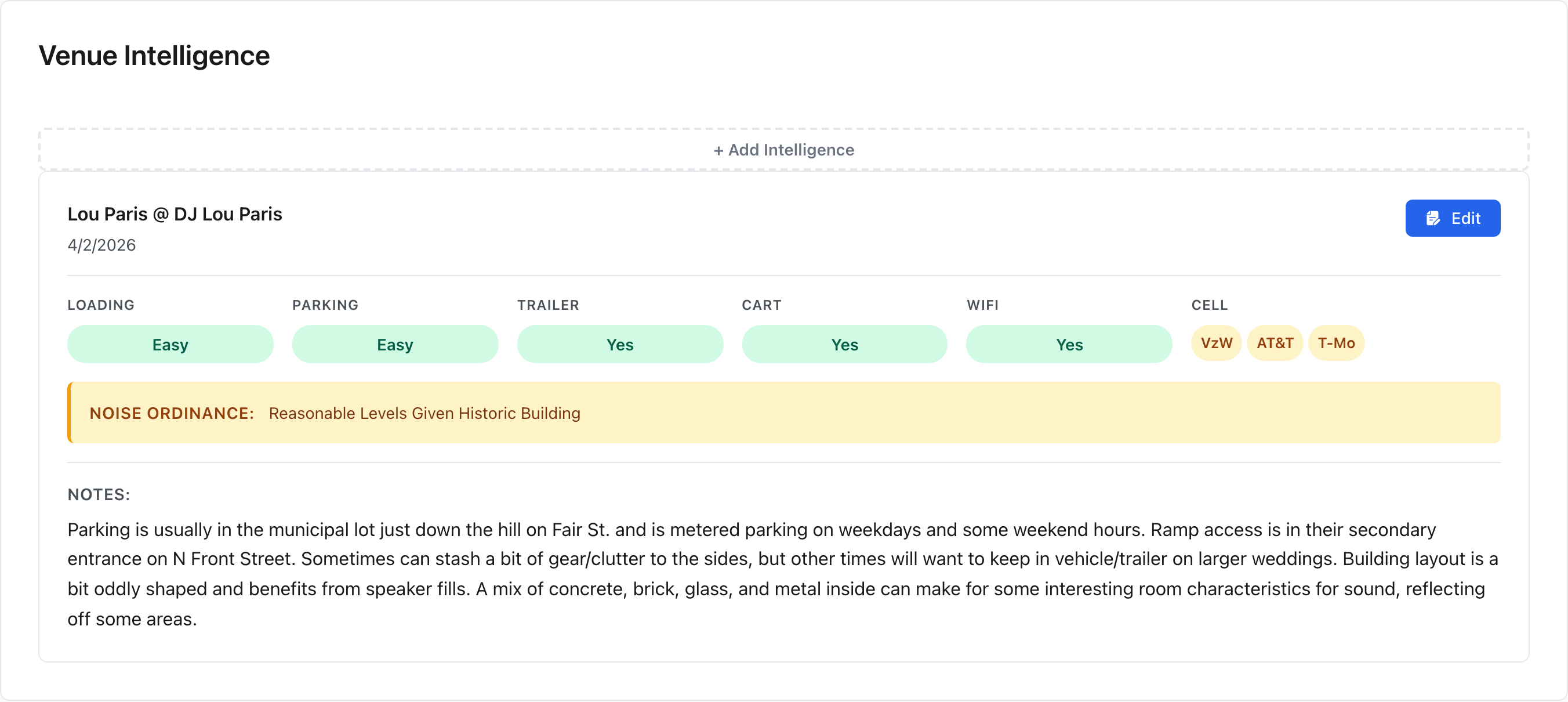
A completed entry - access ratings, connectivity, power distances, restrictions, and notes all in one place
What Venue Intelligence tracks
Every venue record in Zenvents360 can hold crowd-sourced intelligence entries. Each entry covers a core set of operational questions that matter to working professionals:
Trailer Friendly?
Can you pull a trailer to the loading area, or are you parking down the street and hauling?
Cart Friendly?
Flat surfaces, accessible routes - or are you disassembling gear piece by piece up a spiral staircase?
Power at Cocktail?
Is there accessible power in the cocktail area, or do you need to run cable from elsewhere?
Power at Ceremony?
Ceremony spaces are often the worst offenders for power access. Now you know in advance.
Power at Reception?
Main event space power availability - outlets, location, and whether they can handle your load.
Sound Restrictions?
Hard cutoffs, decibel limits, restricted hours - all documented so there are no surprises at 10 PM.
Cell Signal per Carrier?
New in Zenvents360 - track signal quality for Verizon, AT&T, and T-Mobile separately. Carriers behave very differently inside the same building.
WiFi Available?
New in Zenvents360 - venue WiFi availability and whether it is accessible to vendors, not just guests.
Each field is a simple yes/no/unknown dropdown, but every one also has a free-text notes field attached. That is where the real value lives - the drop-down tells you there are sound restrictions; the notes tell you that they enforce a hard stop at 10:30 PM and the venue coordinator will personally walk over to cut your power if you go over.
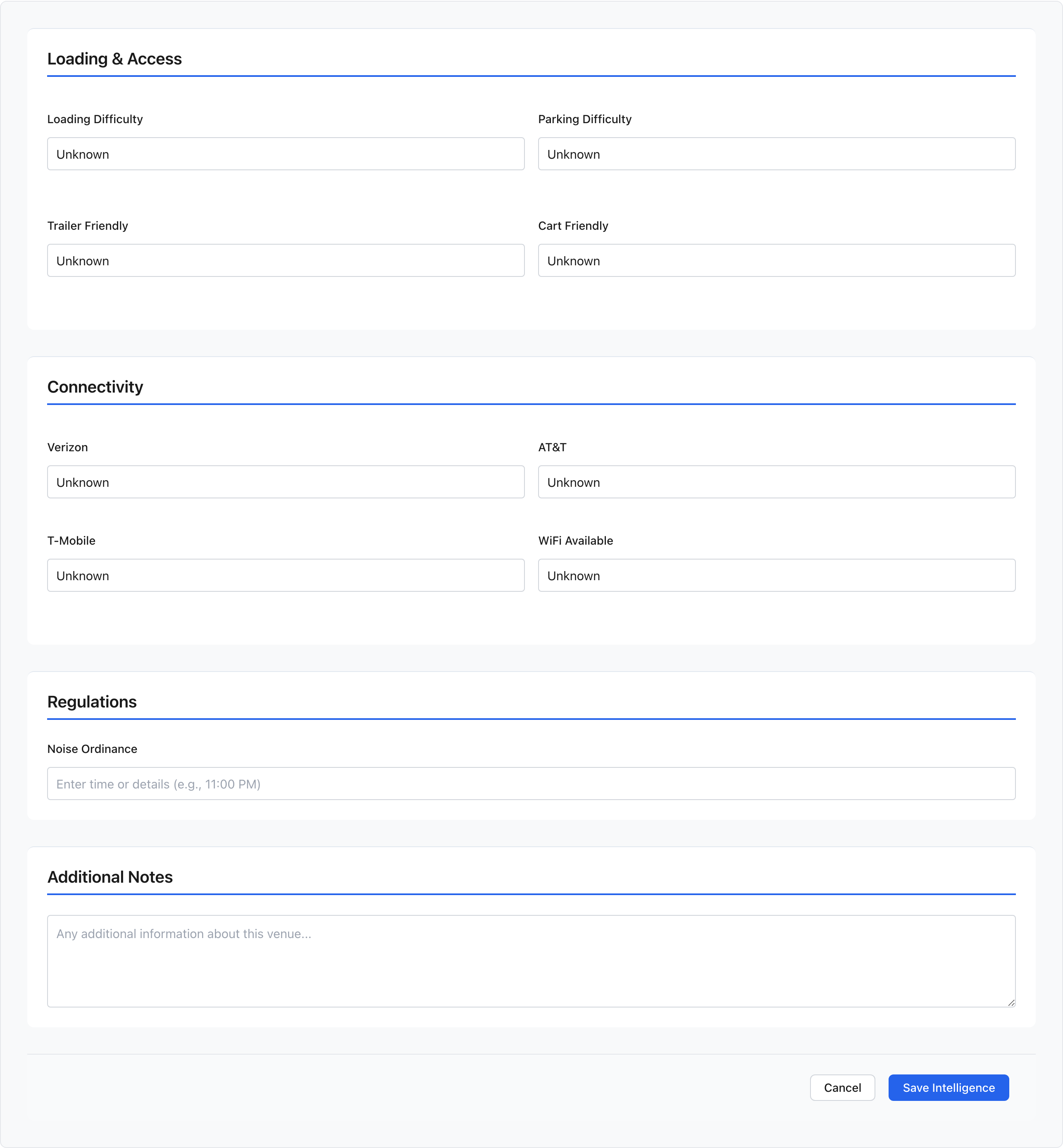
The form - organized into Loading & Access and Connectivity sections, each with dropdown fields and notes
New in Zenvents360: Cell Signal and WiFi
These two fields did not exist in Cue, and the gap was felt. Cell signal and WiFi have become operational necessities - not nice-to-haves. You need signal to coordinate with your team, accept last-minute changes from the client, stream to a secondary feed, or just process a payment from the relative who forgot their checkbook.
Zenvents360 tracks cell signal per carrier - Verizon, AT&T, and T-Mobile - because they do not behave the same way inside the same building. You may have full bars on one network and nothing on another. Knowing that in advance matters if your whole team is on a different carrier than you are.
Knowing in advance that a venue sits in a dead zone gives you the chance to plan around it - bring a hotspot, pre-brief your team on offline coordination, or set expectations with the client before the day arrives.
Multiple entries over time
Venues change. A grand ballroom gets renovated and suddenly there are outlets on the east wall that were not there two years ago. Management changes and the sound restriction that was strictly enforced is now ignored. New entries can always be added to a venue record, building a timeline of intelligence rather than a single static snapshot.
The community aspect is what makes this genuinely powerful. A photographer who worked a venue last month leaves notes about WiFi. A DJ who worked it last weekend updates the sound restriction field. You walk in tomorrow with the benefit of both of those experiences without ever having to call anyone.
How to add Venue Intelligence
Adding information is straightforward. Search for the venue in your Zenvents360 service provider database. If it does not exist yet, you can add it - Google Places powers the search, so most venues are already in the system waiting to be claimed.
Once you are on the venue record, look for the Add Intelligence button. You will see the full field set as simple dropdowns - answer what you know, skip what you do not, and add as much or as little in the notes as is useful. The entry is timestamped, attributed to your account, and immediately available to anyone else who looks up that venue.
Stop walking into venues blind
Venue Intelligence is live in Zenvents360 right now, as part of the full platform.
Start Free Trial →Lou Paris
Founder of Zenvents360. 30+ years in the event industry. Built this because someone said he couldn't.
More feature deep-dives on the way
Event Hand-Off, Dynamic Timelines, Accounting, and more.
← Back to Blog